Express GST || Download GSTR-2A / GSTR-2B Reports
Downloading GSTR-2A / GSTR-2B Reports in Express GST
This document provides a structured procedure for downloading GSTR-2A and GSTR-2B reports in the Express GST application. These reports play a critical role in Input Tax Credit (ITC) verification, reconciliation, and compliance management.
Navigation Path: To access the required reports, navigate through the following path:

GSTR-3B → Eligible ITC → GSTR-2A/2B Report
Procedure to Download Reports
Step 1: Access GSTR-3B Module
From the main dashboard, navigate to the GSTR-3B module.
From the main dashboard, navigate to the GSTR-3B module.
Step 2: Open Eligible ITC Section
Within the GSTR-3B module, select the Eligible ITC option.
Within the GSTR-3B module, select the Eligible ITC option.
Step 3: Select GSTR-2A/2B Report
Click on GSTR-2A/2B Report from the available options.
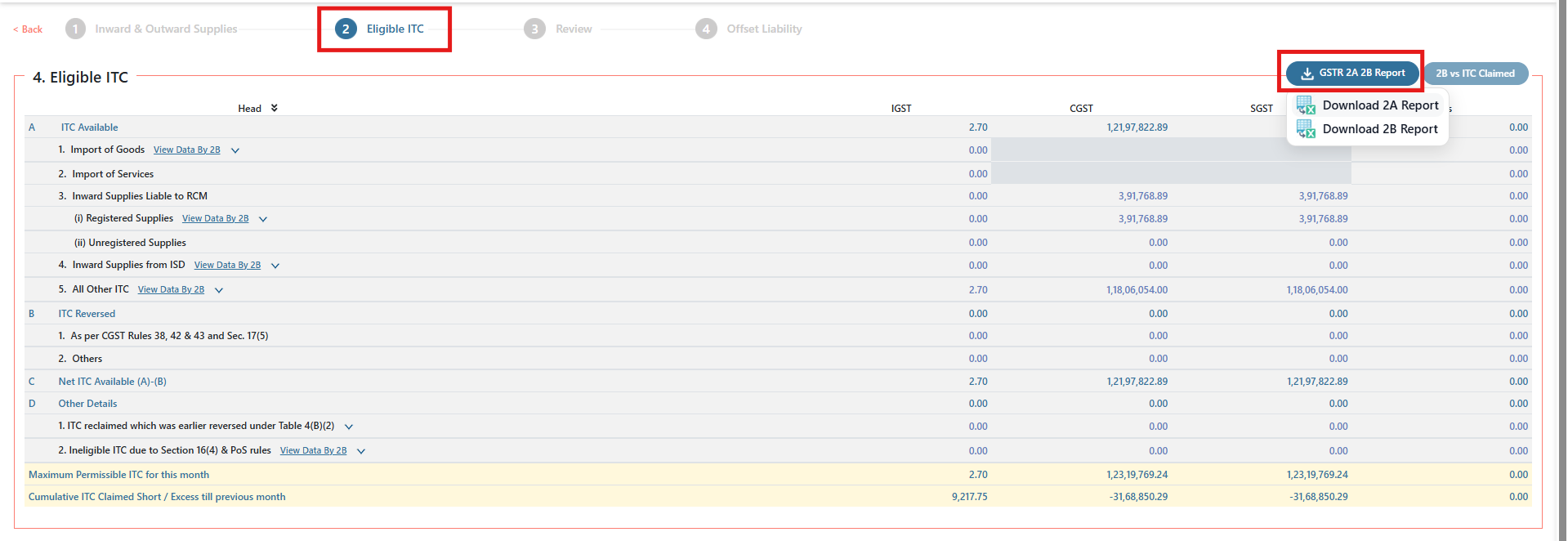
Click on GSTR-2A/2B Report from the available options.
Step 4: Initiate Report Download
- To download GSTR-2A, click on Download 2A Report
- To download GSTR-2B, click on Download 2B Report
Important Considerations
- Ensure that the correct return period is selected prior to initiating the download process.
- GSTR-2A is a dynamic report, which is updated continuously based on supplier filings.
- GSTR-2B is a static report, generated for a specific return period and does not change once published.
- These reports are essential for accurate ITC reconciliation and statutory compliance.
Troubleshooting Guidelines
In case of issues during report download, please verify the following:
- Ensure a stable internet connection.
- Confirm that GST portal credentials and API integrations are properly configured and active.
- Refresh the application session and retry the process.
- If the issue persists, re-login to the application and attempt the download again.
Downloading GSTR-2A and GSTR-2B reports from Express GST enables users to perform accurate ITC validation and maintain compliance with GST regulations. Adhering to the above steps and checks will ensure a smooth and error-free process.